


Listen, I don’t know about you, but I’m generally not so big on listening. I tend to be more of a “words in front of my eyes” kind of guy when it comes to taking in information (which, as I’ve come to learn, also means I’m “an old person” by modern-day standards—hey, I’m okay with that).
Sometimes, though, there’s something to be said for sitting back and enjoying an aural experience—or, as the cool kids call it these days, a podcast. Whether you’re seeking out important info or just casually checking out a conversation about tech, comedy, or whatever floats your dinghy, oceans of options are out there that exist only in the form of audio.
But what happens when you hear something especially noteworthy and you want to remember it—maybe even have it in writing as words in front of your ever-blinky eyes?
That’s where today’s tool springs into action. And lemme tell ya: It’s simple, smart, and something you’ll absolutely appreciate having available.
This tip originally appeared in the free Cool Tools newsletter from The Intelligence. Get the next issue in your inbox and get ready to discover all sorts of awesome tech treasures!
Your 2026 saving—and sharing—supertool
The next time you’re listening to a podcast and want to make a note of something you’ve heard—to share, revisit, or even just save for future reference—remember a handy-as-can-be resource called Podcast Magic.
➜ Podcast Magic is positively brilliant in its simplicity and effectiveness. In fact, you don’t even need to open the website—or any special app, ever.
✅ Here’s how it works:
- You snap a screenshot of your full-screen podcast player at whatever moment you want to remember.
- On Android, the easiest way to do that is by pressing your power and volume-down buttons at the same time. (But you’ve got plenty of other options.)
- On an iPhone, you’ll press the side button and volume-up button together—or the side/top button and home button, if you’re on an older model.
- You send that screenshot in an email to podcastmagic@sublime.app.
- You can use your phone’s built-in sharing command, if you see that pop up on-screen after you snag the screenshot. Just share it over to whatever email app you use, then type or paste in that address in the “To” field and hit “Send.” It doesn’t matter what the subject is or if there’s any text in the body of the email.
- Within a few minutes, Podcast Magic will respond to that same email with a complete transcript of the very same moment you just heard.
So, for instance, I sent over this screenshot:
And I got back this transcript and direct link to the moment I’d heard:
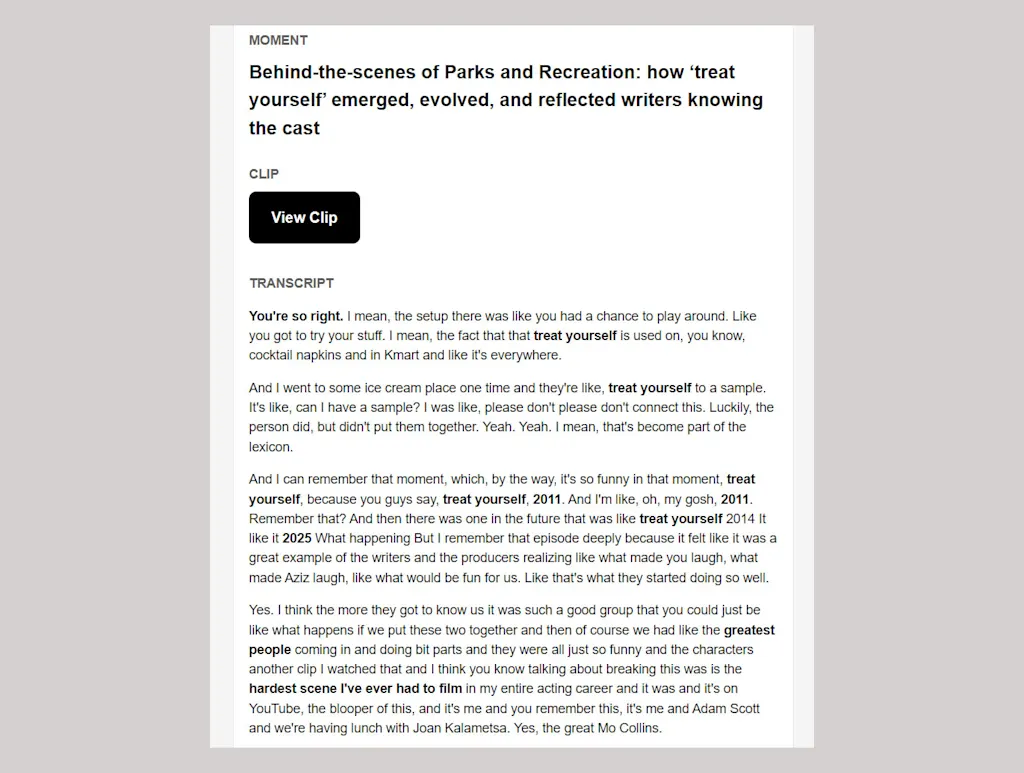
⌚ The whole thing takes maybe 20 seconds to do. And it’s free for a while, though if you use it enough, the service will eventually prompt you to pay $20 once for lifetime unlimited access. (Although, if you really wanna be wily, you could always use the + sign to change to new and different email addresses endlessly in Gmail, thus making the system see you as a new and different user every time you do so.)
☝️ Now, technically, Podcast Magic is meant to work with Spotify or Apple Music. But I’ve been using it with both YouTube Music and Pocket Casts on Android, and it works perfectly well with those, too. As long as the name of the podcast, the name of the episode, and the specific time you’re at in the timeline are all visible on your screen when you capture your screenshot, it doesn’t really matter which specific app you’re using to listen.
With YouTube Music, though, you do have to watch for the way the title of the episode sometimes scrolls to make sure it’s mostly visible when you capture the screenshot. Otherwise, Podcast Magic has no way of seeing what you’re listening to.
Even if you just rely on it once in a great while, it’s a cool tool that’s well worth keeping around for anytime the right moment arises.
- Podcast Magic works entirely via email, simply by sending screenshots to podcastmagic@sublime.app.
- It’s free to use with any given email address up to a point, after which you’ll be asked to upgrade to a premium plan for a onetime $20 fee.
- The service doesn’t require any downloads or sign-ins, and the company behind it says it never shares the limited amount of info (essentially just your email address) that it does see.
Treat yourself to all sorts of brain-boosting goodies like this with the free Cool Tools newsletter—starting with an instant introduction to an incredible audio app that’ll tune up your days in truly delightful ways.